
TL;DR
Automate Aave deposits directly from your smart account using Mimic Protocol. This guide walks through building a function that automatically converts idle tokens into their corresponding Aave aTokens once a USD balance threshold is met.
Quick Details
- Function type: auto-investment (deposit into Aave)
- Strategy: detect when a token balance exceeds a USD threshold and deposit it into Aave
- Key inputs:
aToken,thresholdUSD,chainId
This is just an example. Mimic Protocol lets you automate any DeFi action (deposits, swaps, or complex multi-step investment flows) directly inside your wallet.
What You Need to Get Started
Step-by-Step Aave Auto-Investing Guide.
Understand the Auto-Invest Flow
This function automatically checks your smart account balance and invests it into Aave if it exceeds a USD threshold:
- Find the selected Aave aToken and identify its underlying ERC20 token.
- Fetch your smart account’s balance of the underlying token.
- Convert that balance to USD and compare it to the configured threshold.
- If the threshold is met, supply the full underlying balance to Aave, minting the corresponding aToken.
Define the Function
1. Initialize project
Start a new working directory to develop your function:
npx @mimicprotocol/cli init ./my-aave-auto-investing2. Update your manifest.yaml
The manifest file provides the configuration for your function, including:
- Metadata: Name, description, and version of the function.
- Inputs: Parameters required by the function logic.
- ABIs: Smart contract ABIs to generate type-safe interfaces for the function.
Save this configuration in the manifest.yaml file:
version: 1.0.0
name: Invest in AAVE idle balance
description: Automated function to invest in AAVE idle balance above certain threshold in USD
inputs:
  - chainId: uint32
  - aToken: address
  - smartAccount: address
  - thresholdUsd: string    # e.g., '30.5' = 30.5 USD
  - maxFeeUsd: string       # e.g., '0.05' = 0.05 USD
abis:
  - ERC20: ./abis/ERC20.json
  - AaveToken: ./abis/AaveToken.json
  - AavePool: ./abis/AavePool.json
This manifest file defines different inputs that will be accessible from the function logic code thanks to the types generation process that will be explained in the next section.
It also declares the path for the ERC20 and AaveToken ABIs required by the function logic. Similar to the inputs list, the ABIs will be processed to generate the proper types to access them from the codebase.
For the purpose of this example you can set the ERC20, AaveToken, and AavePool ABIs into ./abis/ERC20.json , ./abis/AaveToken.json and ./abis/AavePool.json (just create a new folder called abis) by adding these files:
AaveToken.json (redirects to GitHub)
AavePool.json (redirects to GitHub)
ERC20.json (redirects to GitHub)
You can adapt this to any auto-investing in Aave, just change the configurations you want.
3. Generate types
This steps allows you to validate the manifest definitions and generate the corresponding code to access both your declared inputs and the contract objects for your declared ABIs.
To do this you can run the codegen command using the CLI:
yarn mimic codegen
4. Write the function logic
The function logic is implemented in AssemblyScript and must export:
- Input type: The generated
inputstype from the previous step. - Main function: The core function logic, which receives the inputs as an argument.
Create a file ./src/function.ts (or update the pre-existing one), and implement the logic:
import { DenominationToken, ERC20Token, log, TokenAmount, USD } from '@mimicprotocol/lib-ts'

import { AavePool } from './types/AavePool'
import { AaveToken } from './types/AaveToken'
import { ERC20 } from './types/ERC20'
import { inputs } from './types'

export default function main(): void {
  // Create a typed ERC20 token instance for the provided aToken address
  // (e.g. aUSDC, aDAI)
  const aToken = ERC20Token.fromAddress(inputs.aToken, inputs.chainId)

  // Instantiate the on-chain Aave aToken contract wrapper
  const aTokenContract = new AaveToken(aToken.address, aToken.chainId)

  // Read the underlying asset address for this aToken
  // (e.g. USDC for aUSDC)
  const underlyingTokenAddressResult = aTokenContract.UNDERLYING_ASSET_ADDRESS()
  if (underlyingTokenAddressResult.isError) {
    throw new Error(underlyingTokenAddressResult.error)
  }
  const underlyingTokenAddress = underlyingTokenAddressResult.value

  // Create a typed ERC20 token instance for the underlying asset
  const underlyingToken = ERC20Token.fromAddress(underlyingTokenAddress, aToken.chainId)

  // Read the Aave Pool address associated with this aToken
  const aavePoolAddressResult = aTokenContract.POOL()
  if (aavePoolAddressResult.isError) {
    throw new Error(aavePoolAddressResult.error)
  }
  const aavePoolAddress = aavePoolAddressResult.value

  // Instantiate the Aave Pool contract wrapper
  const aavePool = new AavePool(aavePoolAddress, inputs.chainId)

  // Create a raw ERC20 contract wrapper for balance and approval calls
  const underlyingTokenContract = new ERC20(
    underlyingToken.address,
    underlyingToken.chainId
  )

  // Fetch the underlying token balance of the smart account
  const underlyingTokenBalanceAmountResult =
    underlyingTokenContract.balanceOf(inputs.smartAccount)

  if (underlyingTokenBalanceAmountResult.isError) {
    throw new Error(underlyingTokenBalanceAmountResult.error)
  }

  const underlyingTokenBalanceAmount = underlyingTokenBalanceAmountResult.value

  // Wrap the raw BigInt balance into a typed TokenAmount
  const underlyingTokenBalance = TokenAmount.fromBigInt(
    underlyingToken,
    underlyingTokenBalanceAmount
  )

  // Convert the token balance into USD using Mimic pricing oracles
  const underlyingTokenBalanceInUsdResult = underlyingTokenBalance.toUsd()
  if (underlyingTokenBalanceInUsdResult.isError) {
    throw new Error(underlyingTokenBalanceInUsdResult.error)
  }
  const underlyingTokenBalanceInUsd = underlyingTokenBalanceInUsdResult.value

  // Parse the user-provided USD threshold input
  const thresholdUsd = USD.fromStringDecimal(inputs.thresholdUsd)

  log.info(`Underlying balance in USD: ${underlyingTokenBalanceInUsd}`)

  // Guard clause:
  // If the USD value of the balance is below the threshold, stop execution
  if (underlyingTokenBalanceInUsd.lt(thresholdUsd)) {
    log.info('Threshold not met')
    return
  }

  // First transaction call:
  // Approve the Aave Pool to spend the full underlying token balance
  const calls = underlyingTokenContract.approve(
    aavePool.address,
    underlyingTokenBalanceAmount
  )

  // Second transaction call:
  // Supply the entire underlying token balance into Aave
  calls.addCallsFromBuilder(
    aavePool.supply(
      underlyingToken.address,        // asset to supply
      underlyingTokenBalance.amount,  // amount to supply
      inputs.smartAccount,             // supply on behalf of this account
      0                                // referral code (unused)
    )
  )

  // Pay transaction fees using Mimic credits, capped by maxFeeUsd
  const feeWithCredits = TokenAmount.fromStringDecimal(
    DenominationToken.USD(),
    inputs.maxFeeUsd
  )

  // Finalize and send the transaction bundle
  calls
    .addUser(inputs.smartAccount)
    .addMaxFee(feeWithCredits)
    .build()
    .send()
}
You can set up an auto-investing strategy on Aave with any ERC-20 (and Aave) tokens across all supported chains, including Arbitrum, Base, Base Sepolia, Ethereum Gnosis, Optimism, and Sonic.
Every function is fully customizable, so you can adapt it to your preferred configuration. For details, explore the Mimic Protocol Library.
For now Mimic function allows creating three types of intents: transfers, generic calls, and crosschain swaps.
5. Compile
The compile process converts your function logic and manifest into deployable artifacts:
build/function.wasm- Compiled WebAssembly binarybuild/manifest.json- Processed manifest configuration
Run the compile command:
yarn mimic compile
Here is an example of the output produced by this command:
build/
├── function.wasm     # Compiled WASM binary
├── manifest.json     # Validated manifest
6. Deploy your function
This is where you upload your function artifacts to the network so others can discover it. To do this you can run the deploy command using the CLI:
yarn mimic deploy --api-key [DEPLOYMENT_KEY]
You can generate a deployment key from the explorer app, where you can login using your wallet.
Link to Mimic Protocol Explorer: https://protocol.mimic.fi/
This command will deploy the generated artifacts from the build directory by default.
This command will upload your artifacts to the Mimic Registry (which stores them on IPFS) and pin the resultant CID so it can be discovered by others. The CID is also written to CID.json in the specified output directory.
7. Generate a Smart Account (If You Haven't)
You can use a Safe, or any smart account. Mimic also allows you to generate a smart account directly from your wallet on any network selected.
Just go to your profile and click on the "Smart Account" section. Approve on your wallet and your smart account will be generated, giving your wallet full control over it.
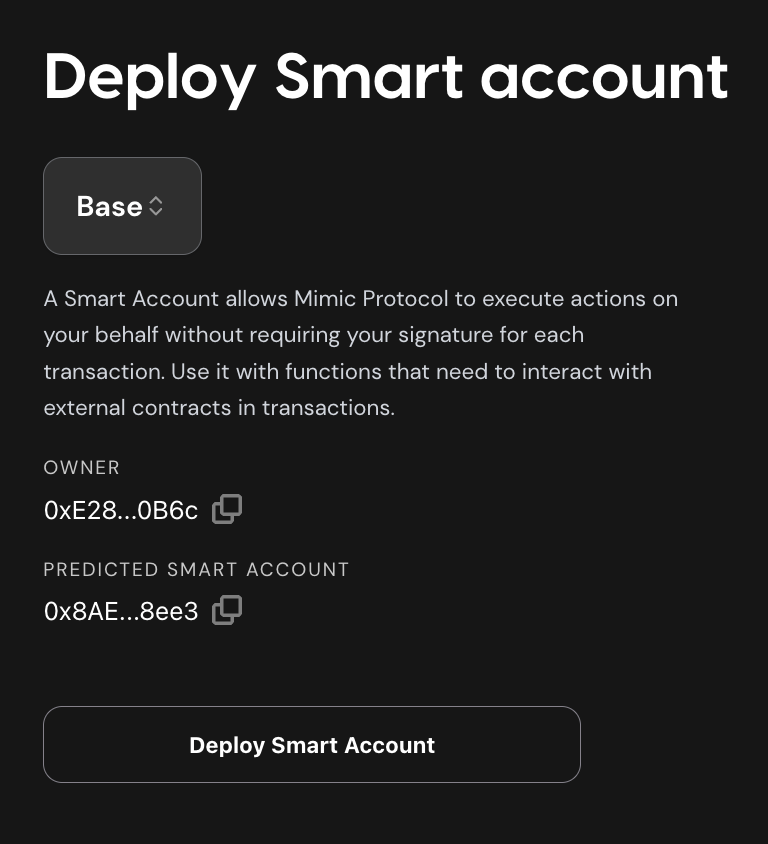
This option generates something similar to a Gnosis Safe, but specific for Mimic. In this example, you can call the Aave contracts directly (for withdrawals), or just create another Mimic function for easier interaction.
8. Give allowance to the Mimic settler
Before you configure your function in the dashboard, you must allow the Mimic Settler to spend tokens on behalf of your smart account.
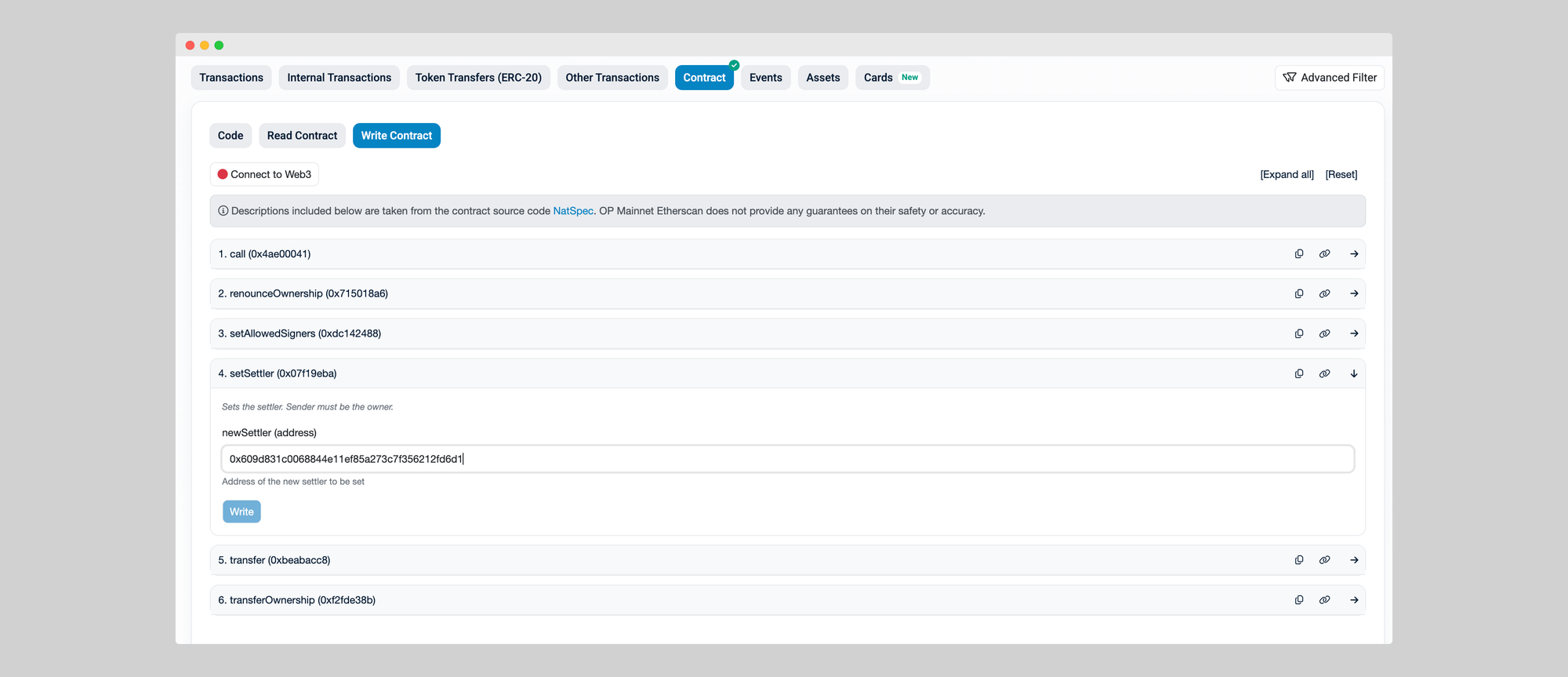
If you created a smart account through the Mimic dashboard, you are set. If you have a different type of smart account:
- Open your network’s block explorer and find your smart account contract.
- Connect your wallet.
- Set the Mimic Settler in "setSettler".
- Approve the contract so it can manage the tokens needed for your function.
Mimic Settler contract:
0x609d831c0068844e11ef85a273c7f356212fd6d1
9. Configure your function
After deploying your function, you can now add a trigger, to tell which trigger relayers should use to run your function. This means defining the parameters declared in your manifest.yml file. This is done in the explorer UI where you will be requested to sign your trigger with your wallet or with the SDK.
- Open the explorer and locate the function you just deployed under the functions section.
- Add or edit your trigger parameters
- Sign the new trigger
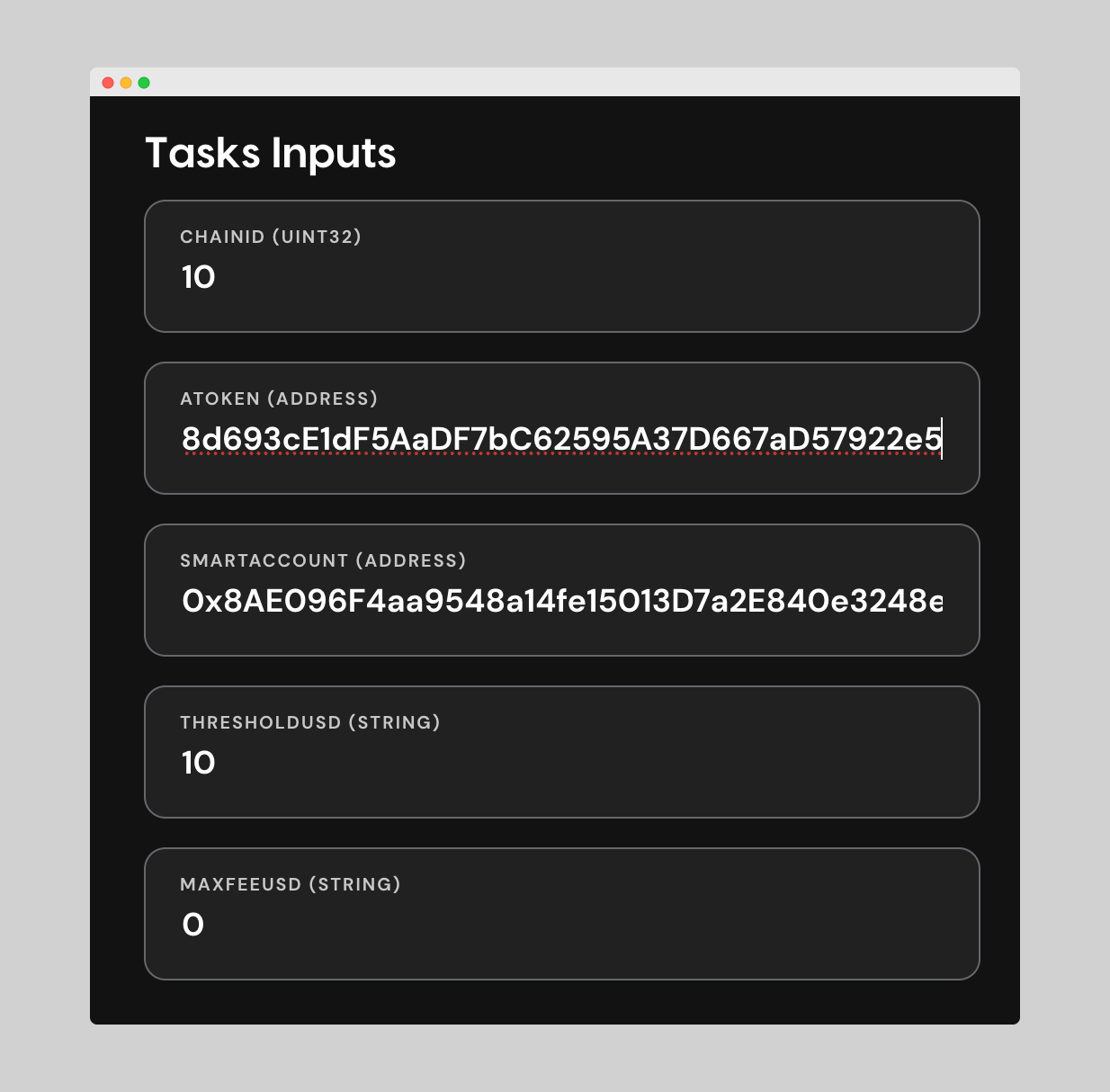
In this example
10 // CHAINID (Optimism)
0x38d693ce1df5aadf7bc62595a37d667ad57922e5 // ATOKEN (for USDC on OP)
10 // THRESHOLDUSD Threshold to send deposit tokens on Aave (in this case if the USD value is above $10 the USDC.e will be deposited.
0 // Max fee in USD
Finally set the delta (time window to execute), the end date (optional), and sign with your wallet
This signature ensures relayers know the trigger is authorized by the function owner.
You can update or deprecate this trigger at any point in time to reflect changes, without needing to redeploy the function code again. Just sign the new trigger in the explorer, and relayers will pick up the latest version.
You will get a confirmation message: Function created successfully!
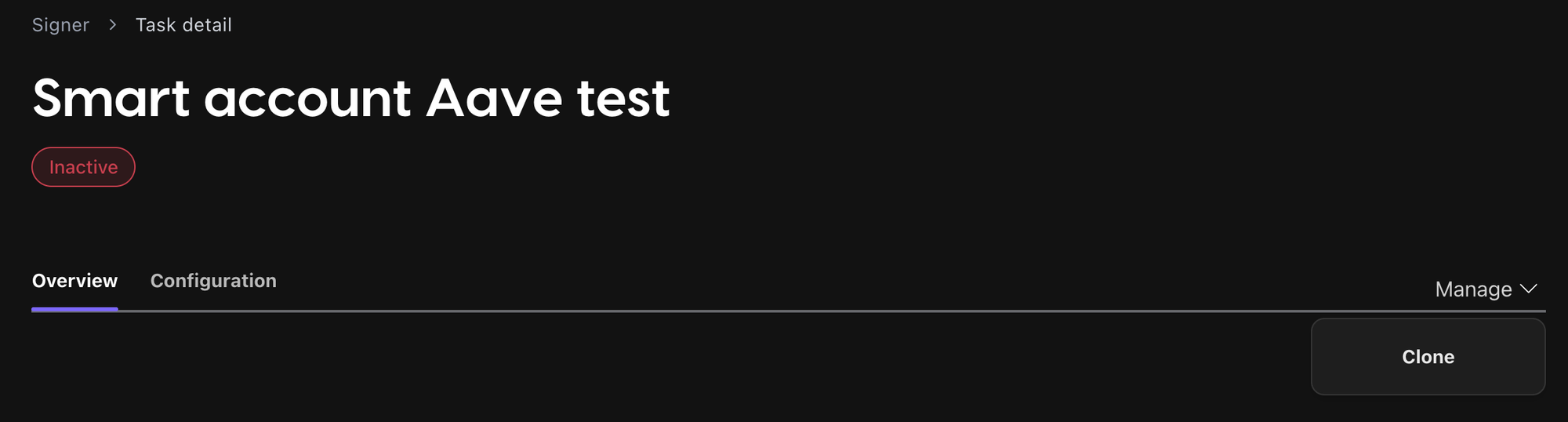
You can check the status of the function at the top of the page, and either deactivate function or execute again (if finished or inactive):
Below, you can see a summary of the function (how many runs, completions, and errors), as well as the recent executions and all details about it (inputs, trigger, creation date…).
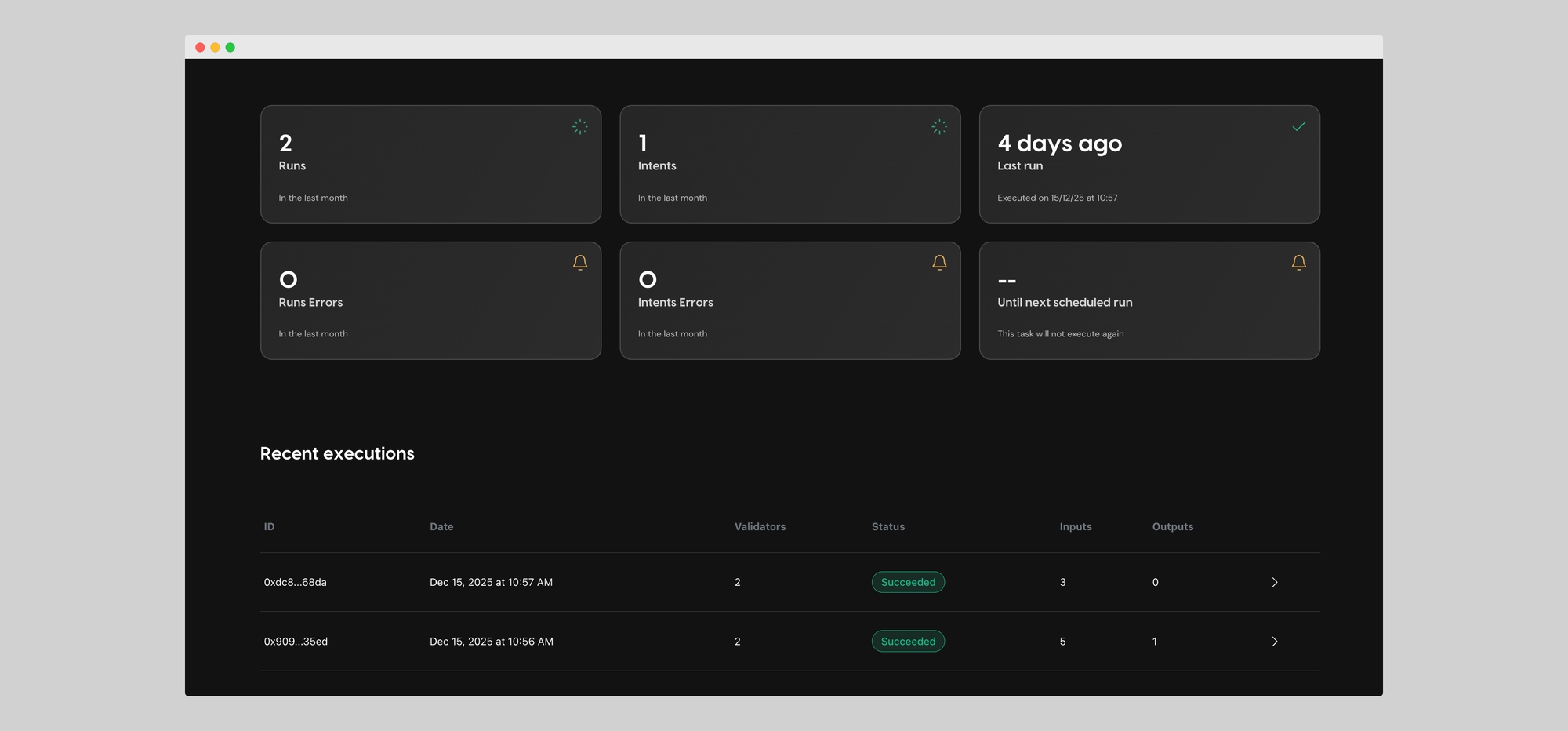
If you press on any of the recent executions, you can get a full execution detail, with info such as inputs, outputs, general details, logs, and more.
You can run multiple functions at the same time, and you can make changes to the configuration by creating a new function, without needing to redeploy the function code again.
10. Withdraw Function
In order to Withdraw from Aave, you can call their contracts directly, or easier just deploy a new Mimic function.
The steps would be the same as in this guide, just changing the .yaml file and the function code to the withdraw workflow.
You can find two functions already written for Aave withdraw in our GitHub examples:
1- Withdraw based on a balance threshold: https://github.com/mimic-protocol/examples/tree/main/examples/06-withdraw-from-aave-balance-threshold
2- Withdraw, swap, and transfer: https://github.com/mimic-protocol/examples/tree/main/examples/07-withdraw-from-aave-swap-and-transfer
Notes & Variations
You will need:
- Smart account with funds (for gas and token approvals)
- API key from Mimic Explorer: https://protocol.mimic.fi/api-key
Remember to give allowance to the settler for your smart account.
You can go to your smart account contract on the explorer, connect your wallet, and add approval to the Mimic settler: 0x609d831c0068844e11ef85a273c7f356212fd6d1
You can easily extend this function to:
- Auto-invest multiple tokens (e.g., DAI, USDC, USDT).
- Withdraw from Aave under certain conditions (e.g., portfolio balancing).
- Combine with yield strategy routing for optimized performance.
👉 With this, you’ve got a production-ready auto-invest strategy: USD-aware, slippage-protected, fully automated, and easy to deploy via signed configs in the Mimic Explorer.

Auto-Investing on Aave is Just the Start
With Mimic Protocol, auto-investing into Aave no longer requires maintaining bots, writing custom scripts, or giving up custody of your funds. You simply define your investment logic once as a function, sign it, and let Mimic relayers execute it automatically and directly from your wallet or treasury, whenever your thresholds are met.
But Mimic Protocol can be used for many other use cases around blockchain automation: wallet rebalancing, yield auto-compunding, DCA, fee management, and many more!
Stay tuned for future guides and details on what automation can unlock onchain. Mimic is the automation engine for Web3.
Try Mimic Protocol Now!
Available on Arbitrum, Base, Base Sepolia, Ethereum, Gnosis, Optimism, and Sonic.

Start simplifying how you code, execute, and scale blockchain projects. Let Mimic handle the busy work while you focus on building.
🐦 X (Twitter) | 📚 Documentation | 💬 Discord | 💻 Telegram