This guide is written for teams migrating off Gelato Web3 Functions before they shut down, and looking for a clean, low-risk and battle-tested alternative.
It focuses on replacing the automation that used to live in Gelato towards Mimic.
What Gelato Web3 Functions were typically used for
Onchain logic and data
- Fetching prices or external signals from APIs
- Refreshing oracles or updating interest rates
- Write here the different use cases
Triggers and schedules
Gelato provided a flexible trigger system that set up when the logic should run:
- Time-based (cron, interval),
- Event-based (onchain events),
- State-based (every block).
Execution + operations
Gelato also handled submitting transactions, managing whitelisted executors, and retrying functions.
Mapping Gelato to Mimic concepts
In order to achieve a successful migration, we want to show how Gelato's concepts translate into the Mimic system.
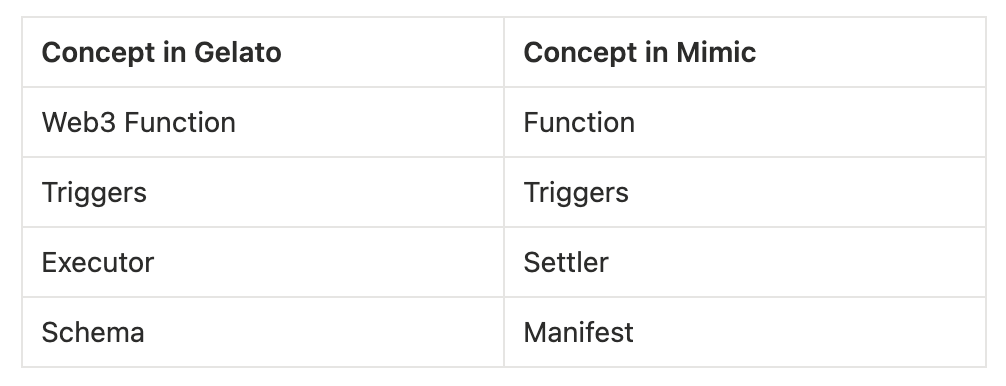
You can easily migrate all of Gelato's Web3 Functions into Mimic Functions, that also support TypeScript.
- A Mimic Function is executable logic onchain that runs on demand of the user
- You can group multiple Functions together to create a project
- And add multiple triggers to run your functions
As you might see, even tho the Mimic system uses a different technical approach than Gelato, some of the workflows are similar, allowing you to quickly rewrite your Web3 Functions into Mimic.
How to start the migration of Gelato Web3 Functions into Mimic
We recommend a step-by-step approach to have everything running smoothly in a short time.
Migration checklist:
- Inventory of existing Gelato functions
- Classify by criticality (leave the most critical for the end)
- Find the TS code of your Web3 Functions
- Translate it into Mimic functions
- Test and deploy one-by-one
- Cut Gelato Web3 functions gradually
Before starting the deployment in Mimic, let’s figure out the differences between Gelato Functions and Mimic Functions.
Example: Automated Fee Consolidation
The goal of this function is to swap multiple tokens for USDC, and transfer the USDC to another account.
How to provide the configuration for the function:
- In Gelato (schema.json)
{
  "web3FunctionVersion": "2.0.0",
  "runtime": "js-1.0",
  "memory": 128,
  "timeout": 30,
  "userArgs": {
    "proxyAddress": "string",
    "tokenInAddresses": "string[]",
    "tokenOutAddress": "string",
    "minOutAmount": "string"
  }
}- In Mimic (manifest.yaml)
version: 1.0.0
name: Collect Function
description: Swaps all user tokens for USDC and sends the USDC to a recipient
inputs:
  - chainId: int32
  - slippageBps: uint16   # e.g., 50 = 0.50%
  - recipient: address
Then the function itself:
- In Gelato
import { AutomateSDK, Web3Function } from "@gelatonetwork/automate-sdk";
import { task } from "hardhat/config";
import "dotenv";

task("consolidate", "Automatically swap accrued tokens")
  .addParam("in", "list of tokens to swap, separated by commas")
  .addParam("out", "unified token to swap input tokens for")
  .addParam("amount", "minimum output amount denominated in output tokens")
  .setAction(async (args, { ethers, w3f }) => {
    const apiKey = process.env.ONEINCH_API_KEY;
    if (!apiKey) throw new Error("Consolidate: missing 1inch API key in .env");

    const tokensIn = (args.in as string).split(" ");
    for (const token of tokensIn) {
      if (!ethers.utils.isAddress(token))
        throw new Error("Consolidate: invalid input token address");
    }

    const tokenOut = args.out as string;
    if (!ethers.utils.isAddress(tokenOut))
      throw new Error("Consolidate: invalid output token address");

    const amount = BigInt(args.amount);
    if (!amount) throw new Error("Consolidate: invalid amount");

    // deploy W3F to IPFS
    console.log("Deploying W3F to IPFS.");

    const consolidateW3f = w3f.get("consolidate");
    const cid = await consolidateW3f.deploy();

    console.log(`Deployed W3F hash ${cid}.`);

    // create W3F task
    console.log("Creating W3F task.");

    const [deployer] = await ethers.getSigners();
    const chainId = await deployer.getChainId();

    const automate = new AutomateSDK(chainId, deployer);
    const web3Function = new Web3Function(chainId, deployer);
    const proxy = await automate.getDedicatedMsgSender();

    const { taskId, tx } = await automate.createBatchExecTask({
      name: "Automated Fee Consolidation",
      web3FunctionHash: cid,
      web3FunctionArgs: {
        proxyAddress: proxy.address,
        tokenInAddresses: tokensIn,
        tokenOutAddress: tokenOut,
        minOutAmount: amount.toString(),
      },
    });

    await web3Function.secrets.set({ key: apiKey }, taskId);
    await tx.wait();

    console.log(
      `Created consolidate task: <https://beta.app.gelato.network/task/${taskId}?chainId=${chainId}`>
    );
});- In Mimic
import {
  Arbitrum,
  Base,
  ChainId,
  environment,
  ListType,
  log,
  Optimism,
  SwapBuilder,
  Token,
  USD,
} from '@mimicprotocol/lib-ts'

import { inputs } from './types'

export default function main(): void {
  const chainId = inputs.chainId
  const context = environment.getContext()

  // Find tokens with user's balance > 0
  const amountsIn = environment.relevantTokensQuery(context.user, [chainId], USD.zero(), [], ListType.DenyList).unwrap()
  if (amountsIn.length == 0) {
    log.info(`No tokens found on chain ${chainId}`)
    return
  }

  const USDC = getUsdc(chainId)

  for (let i = 0; i < amountsIn.length; i++) {
    const amountIn = amountsIn[i]
    const amountOut = amountIn.toTokenAmount(USDC).unwrap()
    const minAmountOut = amountOut.applySlippageBps(inputs.slippageBps as i32)

    // Note that the recipient will receive the USDC
    SwapBuilder.forChain(chainId)
      .addTokenInFromTokenAmount(amountIn)
      .addTokenOutFromTokenAmount(minAmountOut, inputs.recipient)
      .build()
      .send()

    log.info(`Adding swap of ${amountIn} to ${minAmountOut} on chain ${chainId}`)
  }
}

function getUsdc(chainId: i32): Token {
  if (chainId == ChainId.ARBITRUM) return Arbitrum.USDC
  if (chainId == ChainId.BASE) return Base.USDC
  if (chainId == ChainId.OPTIMISM) return Optimism.USDC
  throw new Error('Invalid chain')
}
You can learn more about how to write a Mimic function in our documentation: https://docs.mimic.fi/
And library: https://docs.mimic.fi/developers/library

What is Mimic and how does it work?
Mimic is a developer platform to build blockchain apps, unlocking automation for your Web3 stack in a simple way.
Using the Mimic platform consists of the following steps:
- Start your function: start a working directory to create your function
- Define the manifest: it’s a .yaml file where you write the metadata (name, description, version), parameters, and other things
- Generate types
- Write the function logic
- Build: validate and compile the function logic
- Deploy: upload your build to the Mimic registry, so it’s available to execute
Useful resources to start with Mimic
Starting guide: https://docs.mimic.fi/examples/build-a-simple-function
How to understand the platform quickly: https://www.mimic.fi/blog/understand-mimic-in-10-minutes
Migrate Gelato Web3 Functions to Mimic and achieve more
Mimic has a similar approach to Gelato Automation, but also lets you achieve even more:
- Multi-step workflows: you can compose logic that can be chained, and reused, enabling solutions to cover any use case you need. Just chain multiple functions or have them listen to each other to activate.
- Cross-chain by design: one function or project can safely operate across multiple networks.
- Built-in safety engine: Mimic includes native safeguards and policies (constraints that define what must and must never happen).
For teams coming from Gelato automation, Mimic feels close enough that you can migrate quickly, while still unlocking more advanced use cases over time.
Need help migrating from Gelato Web3 Functions?
We’re always happy to help!
You can reach us out here:
Discord: https://discord.mimic.fi/
Telegram: https://t.me/+cBCtvvZuGpplNmY8